GraphDiagram
A graph-theory diagram — vertices and edges — where you never supply a coordinate. Give it a vertex set and an edge set, and the library computes every position:
Graph g = Graph();
g.add_edge("A", "B");
g.add_edge("B", "C");
g.add_edge("C", "A");

Image img = Image();

img.width(8);

img.height(8);
img.add(g);
That’s a complete figure. add_edge creates either endpoint the first time it’s named, so a graph can be specified purely as an edge list — add_vertex is only needed for an isolated vertex with no edges. Graph is a typedef alias for GraphDiagram, the same way Plot aliases ContinuousPlot.
Methods
| Method | Purpose |
|---|---|
Graph() | Build an empty graph |
add_vertex(label) | Add a vertex (only needed for isolated vertices) |
add_edge(from_label, to_label, label="") | Add an edge, creating either endpoint if new; label is a weight/annotation |
set_directed(bool) | Draw arrowheads on every edge |
set_layout(layout) | Choose the placement algorithm (see below) |
set_root(label) | TREE only — which vertex goes on top |
set_source(label) | LAYERED only — which vertex goes in the leftmost layer |
set_grid_dimensions(rows, cols) | GRID only — leave either 0 to derive it |
set_outer_face(labels) | PLANAR only — the outer face, in cyclic order |
set_seed(int) | RANDOM only — which scatter to produce |
get_seed() | RANDOM only — the seed currently in effect |
set_seed_from_time() | RANDOM only — seed from the system clock instead, for a different scatter each render |
set_uniform_vertex_size(bool) | Draw every vertex at the same size instead of auto-widening each to fit its own label |
set_avoid_vertex_overlap(bool) | Curve an edge around an unrelated vertex it would otherwise pass close to (on by default) |
set_debug_mode(bool) | Draw bounds |
Layouts
set_layout takes one of eight constants. Most need nothing but the edges:
| Constant | Needs only V+E? | Best for |
|---|---|---|
FORCE (default) | Yes | General graphs |
CIRCULAR | Yes | Cycles/circuits, complete graphs, small graphs |
BIPARTITE | Yes — the 2-coloring is computed for you | Bipartite graphs, matchings |
TREE | Yes — root defaults to the first vertex | Trees, hierarchies |
LAYERED | Yes — source defaults to the first vertex | Flow networks |
GRID | Yes — dimensions derived from the vertex count | Lattices, meshes |
RANDOM | Yes — ignores edges entirely | Showing that a drawing isn’t unique |
PLANAR | No — needs set_outer_face | Crossing-free planar drawings |
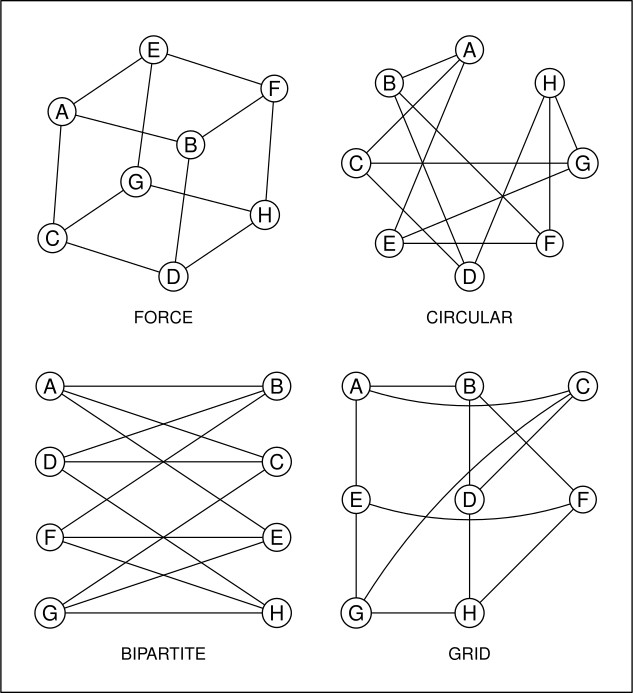
FORCE is Fruchterman–Reingold: vertices repel like charged particles, edges pull like springs, and the system cools to equilibrium. It’s seeded from a circle rather than a random scatter, so the same graph always renders identically — a figure won’t shift between builds of the same document.
PLANAR is Tutte’s spring embedding, the one genuinely topological algorithm here: pin the outer face to a polygon, then repeatedly move every interior vertex to the average of its neighbors. For a 3-connected planar graph this provably produces a drawing with no crossing edges. It’s also the only layout that can’t run from the edge list alone, since the guarantee depends on knowing which face is outermost.
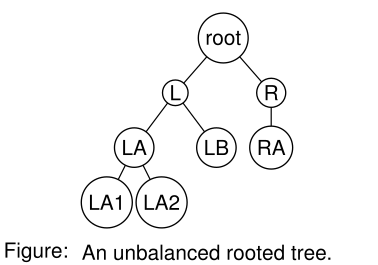
TREE lays out a rooted tree by breadth-first depth, centering each parent over its own children:
RANDOM is the odd one out: it ignores the edges entirely and scatters the vertices across an n×n lattice (n = the vertex count), sampling without replacement so no two ever collide. The first four vertices are pinned one to each side of the lattice, which is what makes the scatter fill its box — those four alone force the bounding box to span the whole lattice, so the result scales up to the full area instead of huddling wherever sampling happened to land. It’s useful for showing a class that a graph’s drawing is not unique:
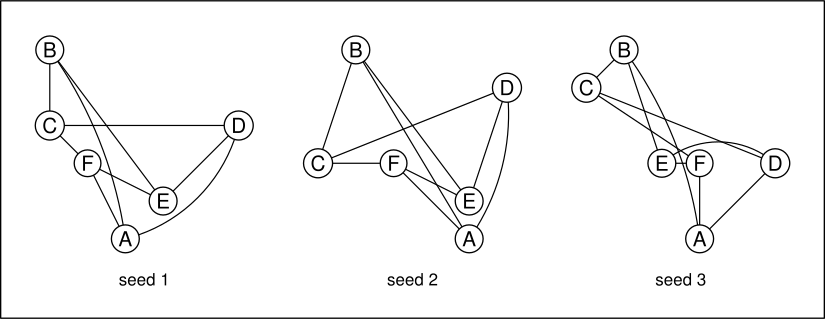
Despite the name it is not unstable between renders: the scatter is seeded, so a given seed always reproduces the same picture. Pass set_seed(n) to pick a different arrangement — changing the seed is what changes the layout, not re-running the file. (FORCE gives the same guarantee for the same reason, seeding its relaxation from a circle rather than a random scatter, so a figure never shifts between builds of an unchanged document.)
If you actually want a different scatter on every render — e.g. browsing a few arrangements before picking one — call set_seed_from_time() instead of set_seed(n). It seeds from the system clock, deliberately trading away the reproducibility guarantee above; call get_seed() afterward to read off whatever seed you land on, and pin it down with set_seed(that_value) once you’ve found one worth keeping.
Graph g = Graph();
g.add_edge("A", "B");
g.add_edge("B", "C");
g.set_layout(RANDOM);
g.set_seed(7);        // a different arrangement; still identical on every render
Two layouts can fail on a graph that doesn’t support them, and both fail loudly rather than drawing something misleading: BIPARTITE on a graph with an odd cycle, and PLANAR without an outer face of at least 3 vertices.
Edge features
Directed edges, weights, self-loops, and parallel edges all work together:
Graph network = Graph();
network.set_directed(true);
network.set_layout(LAYERED);
network.set_source("s");

network.add_edge("s", "a", "16");   // labeled with a capacity
network.add_edge("s", "b", "13");
network.add_edge("a", "b", "4");
network.add_edge("a", "b", "9");    // parallel edge — bowed apart from its sibling
network.add_edge("b", "b", "loop"); // self-loop — drawn as a loop at the vertex
network.add_edge("b", "t", "20");
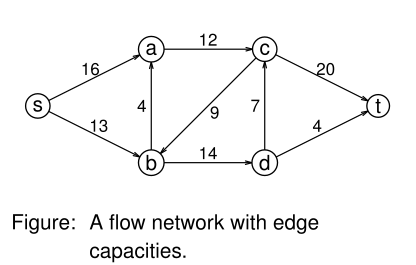
Parallel edges between the same pair are bowed symmetrically about the straight line between them so each stays visible; for an undirected graph A→B and B→A count as the same pair, while for a directed one they’re opposite arcs and stay separate. Multiple self-loops at one vertex are rotated around it. Edges stop at each vertex’s rim rather than its center, which is what puts a directed edge’s arrowhead against the circle instead of hidden underneath it. Vertex circles auto-widen to fit their own labels, so a multi-character name doesn’t overflow — call set_uniform_vertex_size(true) if you’d rather every circle be the same size (fit to the widest label) even when names vary in length, e.g. a tree mixing "L" with "LA1" (as in the TREE example above).
A straight edge that would otherwise pass close enough to an unrelated vertex to read as if that vertex were connected too curves around it instead — on by default, and a no-op whenever nothing is actually in the way, so it never changes a diagram that didn’t need it. Turn it off with set_avoid_vertex_overlap(false) if a particular curve looks worse than the straight line it’s avoiding. This is a heuristic, not a general-purpose router: it only reroutes around one vertex at a time (the worst offender, if several are close), and it isn’t aware of other edges, only vertices.
Styling lives in the theme: graph_vertex_fill, graph_vertex_outline, graph_vertex_radius, graph_edge_color, graph_edge_thickness, graph_directed_arrow, graph_edge_label_offset, graph_multi_edge_bow, graph_edge_vertex_clearance, graph_self_loop_size, graph_self_loop_angle, graph_layout_margin, graph_force_iterations, and graph_random_seed.