TruthTable
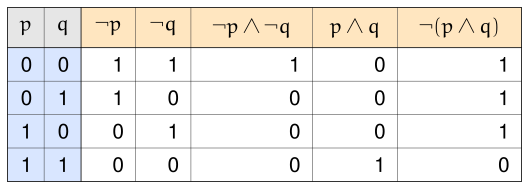
TruthTable builds a truth table one boolean expression at a time. There’s nothing to declare up front — no variable list, no evaluator function to write — just add each expression as a plain string, and the table works out the rest: which atomic propositions it needs, how many rows to generate, and what every cell evaluates to.
truth_table.asy
import MaximumMathematics;

TruthTable table = TruthTable();
table.add("!p");
table.add("!q");
table.add("!p & !q");
table.add("p & q");
table.add("!(p & q)");

Image img = Image();
img.width(14);
img.height(5);
img.padding(0.2);
img.add(table);
Constructing expressions
Every column starts as a plain string passed to add(). The parser understands parentheses and six operators, and turns each one into the matching LaTeX command for the rendered header — so the header shows real ¬/∧/∨ symbols, not the characters you actually typed.
| You write | Becomes (LaTeX) | Renders as |
|---|---|---|
! (not) | \neg | ¬ |
& (and) | \land | ∧ |
\| (or) | \lor | ∨ |
^ (xor) | \veebar | ⊻ |
-> (implies) | \rightarrow | → |
<-> (iff) | \leftrightarrow | ↔ |
These bind tightest to loosest in the order above — ! binds tightest, <-> loosest — so "p -> q & r" parses as p -> (q & r), and "p | q ^ r" parses as (p | q) ^ r. Parentheses always override this.
Variable discovery
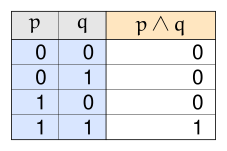
You never declare atomic propositions directly. add() discovers them from whatever letters appear in the expression, and folds each newly-seen one into a running list shared across every expression added so far — a variable only needs to appear once, in any expression, to get its own column.
That list is always kept in alphabetical order, regardless of the order the variables first appeared in. The left-most atomic-proposition column is always the alphabetically-first variable, even if a later add() call is what actually introduced it. Expression columns are different: those stay in the order you add()ed them, left to right.
basic_two_variables.asy
import MaximumMathematics;

// Example: a single expression over two atomic propositions.

TruthTable table = TruthTable();
table.add("p & q");

Image img = Image();
img.width(6);
img.height(4);
img.padding(0.3);
img.add(table);
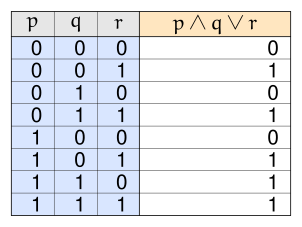
The same thing scales to as many atomic propositions as an expression needs — a table always has 2ⁿ rows for n atomic propositions, cycling through every combination the same way ordinary digits count: the right-most atomic-proposition column changes every row, and each column to its left changes half as often, so the left-most column changes only once across the whole table.
three_variables.asy
import MaximumMathematics;

// Example: a single expression over three atomic propositions.

TruthTable table = TruthTable();
table.add("(p & q) | r");

Image img = Image();
img.width(8);
img.height(6);
img.padding(0.3);
img.add(table);
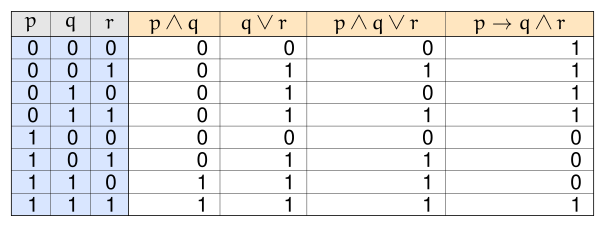
Adding several expressions that share atomic propositions still produces just one set of atomic-proposition columns — every expression is evaluated against the same rows:
multiple_expressions_three_variables.asy
import MaximumMathematics;

// Example: several expressions, together depending on three atomic propositions.

TruthTable table = TruthTable();
table.add("p & q");
table.add("q | r");
table.add("(p & q) | r");
table.add("p -> (q & r)");

Image img = Image();
img.width(16);
img.height(6);
img.padding(0.3);
img.add(table);
Highlighting
Any cell, row, or expression column can be highlighted for emphasis.
Highlighting a cell
highlight(row, column) highlights one interior (expression) cell — and, so the row and column it belongs to are easy to trace, that row’s atomic-proposition cells and that expression’s own header are highlighted too. row is a 0-indexed data row; column is a 0-indexed expression column (0 = the first add()ed expression — the atomic-proposition columns don’t count towards it).
highlighted_cell.asy
import MaximumMathematics;

// Example: highlighting a single interior cell (row 2 -> p=1, q=0; column 1 -> "p | q").

TruthTable table = TruthTable();
table.add("p & q");
table.add("p | q");
table.highlight(2, 1);

Image img = Image();
img.width(8);
img.height(5);
img.padding(0.3);
img.add(table);
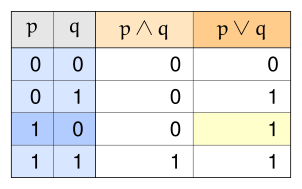
highlight() can be called more than once — every call adds one more highlighted cell, and each is handled independently:
highlighted_cells.asy
import MaximumMathematics;

// Example: highlighting three interior cells at once. (0, 0) and (0, 2) share row 0, and (3, 1)
// shares neither a row nor a column with either of the other two.

TruthTable table = TruthTable();
table.add("p & q");
table.add("p | q");
table.add("p ^ q");
table.highlight(0, 0);
table.highlight(0, 2);
table.highlight(3, 1);

Image img = Image();
img.width(10);
img.height(5);
img.padding(0.3);
img.add(table);
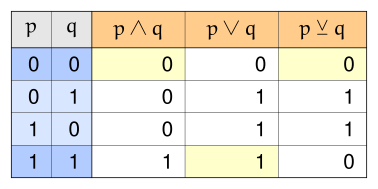
A cell that merely shares a row or column with a highlighted cell, without being highlighted itself, is left alone — only the exact cells passed to highlight(), and the row/column context around each one, are affected.
Highlighting a row
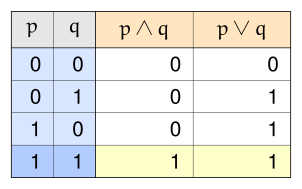
highlight_row(row) highlights every cell in a data row — every atomic-proposition cell and every expression cell in that row — without touching any header.
highlighted_row.asy
import MaximumMathematics;

// Example: highlighting an entire data row (row 3 -> p=1, q=1).

TruthTable table = TruthTable();
table.add("p & q");
table.add("p | q");
table.highlight_row(3);

Image img = Image();
img.width(8);
img.height(5);
img.padding(0.3);
img.add(table);
Highlighting a column
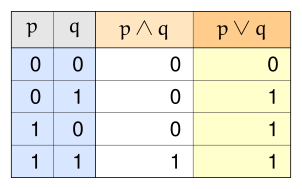
highlight_column(column) highlights one expression column’s header and every one of its data cells, without touching any row.
highlighted_column.asy
import MaximumMathematics;

// Example: highlighting an entire expression column (column 1 -> "p | q").

TruthTable table = TruthTable();
table.add("p & q");
table.add("p | q");
table.highlight_column(1);

Image img = Image();
img.width(8);
img.height(5);
img.padding(0.3);
img.add(table);
Hiding
Any expression cell’s “0”/”1” text can be hidden — useful for a worksheet where a student fills in the blanks. hide_table()/hide_row(row)/hide_column(column)/hide_cell(row, column) blank out a cell’s text; the matching show_table()/show_row(row)/show_column(column)/show_cell(row, column) make it visible again. row/column mean exactly what they mean for highlighting above.
Headers and atomic-proposition value cells can never be hidden — only expression (interior) cells. Hiding is completely independent of highlighting: a hidden cell keeps whatever fill color it would otherwise have, highlighted or not, and just draws no text.
State resolves last-call-wins, per cell — whichever hide/show call most recently touched a given cell, at any granularity, decides whether it’s visible:
TruthTable table = TruthTable();
table.add("p & q");
table.add("p | q");
table.add("p ^ q");
table.hide_table();          // blank every expression cell...
table.show_cell(2, 1);       // ...except this one
table.hide_column(1);        // hide every cell in "p | q"...
table.show_row(3);           // ...except row 3, which shows in every column again
Methods
| Method | Purpose |
|---|---|
TruthTable() | Create an empty table |
add(string expression) | Parse and add one expression column, discovering any new atomic propositions |
highlight_row(int row) | Highlight every cell in a data row |
highlight_column(int column) | Highlight an expression column’s header and every one of its cells |
highlight(int row, int column) | Highlight one interior cell, that row’s atomic-proposition cells, and that column’s header |
hide_table() | Hide every expression cell’s text |
show_table() | Show every expression cell’s text |
hide_row(int row) | Hide every expression cell’s text in a data row |
show_row(int row) | Show every expression cell’s text in a data row |
hide_column(int column) | Hide an expression column’s cell text |
show_column(int column) | Show an expression column’s cell text |
hide_cell(int row, int column) | Hide one interior cell’s text |
show_cell(int row, int column) | Show one interior cell’s text |